Search This Blog

Friday, 26 May 2023

SpeedyBee F405 Wing soft serial fix

The SpeedyBee F405 Wing is an inexpensive but fully featured flight control board for INAV or Ardupilot.

The first release INAV 6 firmware for this board did not have soft serial support enabled, so it was not possible to use Smart Port telemetry from FrSKY receivers.

Smart Port connection from an FrSKY receiver allows all telemetry to be sent back to the radio.

Here are the updated firmware hex files to enable soft serial on the T2  pin of UART2:

SpeedyBee F405 Wing INAV 6.1.0 fix soft serial firmware 


UPDATE JUNE 2023

S8 bug fix - With the factory loaded firmware S8 pins did nothing, S9 acted as S8, S10 acted as S9 etc.

This has been remedied with the release of SB F405 Wing INAV 6.1 firmware. 


INAV UPDATE 

Latest firmware INAV 6.1.1 also fixes the "Dolphining" problem which was introduced by INAV 6.1 to all FCBs

Saturday, 20 May 2023

Smart Port Telemetry, INAV and F4

FrSKY receivers with S-Port capability can send telemetry data back to the transmitter. The data can come from FrSKY S-Port telemetry sensors but also from flight control boards (FCBs).

SBUS and Smart Port are inverted signals, compared to normal convention for flight control boards and receivers. Flight control boards need to un-invert these inputs to be usable.

F7 boards have inverters on all UARTs which can be enabled in the configurator, so SBUS and SmartPort inputs can be connected to any UART.

F4 boards only have one UART inverter (for SBUS), usually on the Rx2 pin. But we need an inverted Tx pin for the Smart Port input.

So this is where Soft Serial comes in. Soft Serial creates a software defined UART which can be inverted.

By enabling Soft Serial or "CPU based serial ports" Tx2 becomes available as an inverted pin for Smart Port connection.

The steps below show how:

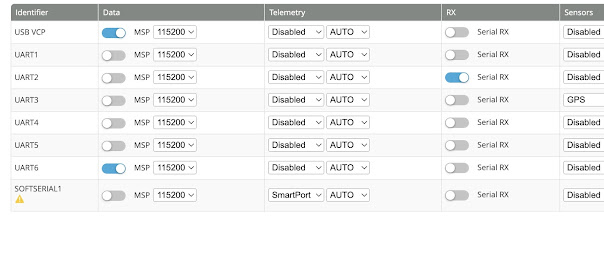
1. Enable "Enable CPU based serial ports" and "Telemetry output" in the INAV configuration page


2. Choose "SmartPort" in the Telemetry column for SOFTSERIAL1 in the Ports page


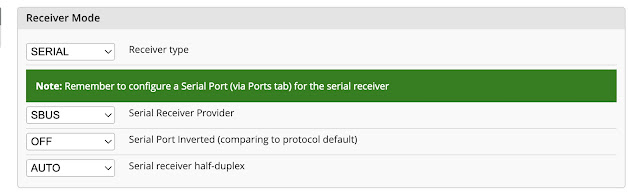
3. Choose SBUS, OFF, AUTO or OFF in the Receiver page


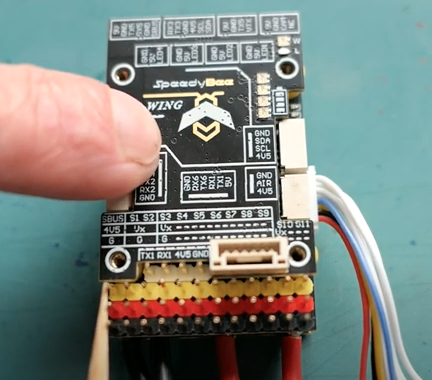
4. On the F4 board connect SBUS to the SBUS pin and SmartPort into the TX2 pin


5. "Discover new" sensors on your transmitter, and you should see all the extra FC telemetry appearing.


Friday, 7 April 2023

Big Box Plane

 Design for a large slower flying cardboard plane.

1400mm wingspan

230mm chord (CG 65mm)

Clark Y airfoil

950g Flying weight with 3S 2200mah

ZOHD 2216 1300kv motor with 8x6 prop and 40A ESC

Materials

Cardboard box

Bamboo skewers

50mm packing tape

Hot glue

PVA glue


Build overview and flight video

https://youtu.be/DcXUbrYCyTM


Thursday, 13 January 2022

SEQURE SI012 Intelligent soldering iron


Can use Sequre T12 tips and Hakko 001 long tips by changing contact positions.

Purchase links

Sequremall - https://sequremall.com/products/sequre-si012-oled-soldering-iron Aliexpress - https://www.aliexpress.com/item/1005003792787853.html SI012 Features 1. Multi mode power supply: dc12-25v, 3s-6s, pd3.0 2. Compatible with Sequre 001 and Hakko T12 soldering iron heads 3. Buzzer function reminder. 4. Programmable firmware upgrade. 5. Intelligent temperature control algorithm, one key temperature rise, accurate temperature calibration and efficient compensation.


Friday, 27 November 2020

How to find stuff on my YouTube channel

 Search for a specific video (Only on a computer)


Playlists of related videos (Playlist Tab)


Find my email address (About Tab - Only on a computer)


Read the description


Sunday, 25 October 2020

RC, FPV and FCB terms


FPV - First Person View. Flying a model while wearing video goggles or watching a screen showing video transmitted from the aircraft.

VTx VRx - Video transmitter and video receiver used for FPV.

FCB - Flight Control Board (eg. Matek F405-Wing)

MCU - Microcontroller Unit (Main processor chip of FCB eg. STM32F405)


IMU - Inertial Measurement Unit (Gyro and Accelerometer chip eg. MPU6000)


Baro - Barometer Altitude sensor (eg. BMP280)


Magnetometer - Electronic Compass (eg QMC5883)


DFU - Direct Firmware Upload (Processor Mode which allows firmware upload)


MSP - Multiwii Serial Protocol. Communication protocol used by INAV and FCBs. MSP came from Multiwii software, which was derived from the Nintendo Wii Game Controller. 


Serial Port - Pins or pads on FCBs for connecting external devices. Serial means all channel signals use the same wire. 


UART - Universal Asynchronous Receiver Transmitter Serial port. Pins or pads where UART devices (GPS, RC receivers, camera controls) connect to the FCB. Pins labelled - Ground Voltage RX TX. RX from the device connects to TX on the FCB


I2C or I squared C - Inter Integrated Circuit Serial port. Pins or pads where I2C devices (compass, OLED screen) connect to the FCB. Pins labelled - Ground Voltage SDA SCL


SPI - Serial Peripheral Interface. Connection interface for onboard devices like SD card reader and barometer


ADC - Analog to Digital converter. FCB component that converts a varying voltage input to a digital output. Used for displaying battery voltage, current, analog airspeed sensor and analog RSSI values.


Soft Serial - Extra Serial port enabled in software, by repurposing spare UARTs pins. Eg Smart Port telemetry connection to an unused TX pin.


Vbat - Flight battery Voltage. May be filtered on some FCBs to reduce video interference


OSD - On Screen Display


GNSS - Global Navigation Satellite System (Commonly called GPS, but GPS only refers to the US satellite system. Other GNSS systems include Galileo, GLONASS)


OLED - Organic Light Emitting Diode used in OLED data display screens and some FPV goggles


RSSI - Received Signal Strength Indicator. A number representing the strength of an RC signal at the receiver.


LQ - Link Quality. A number representing the strength and quality of an RC signal.


LFR - Lost Frame Rate % - Percentage of lost frames in an RC Signal


PWM - Pulse Width Modulation. Basic RC signal protocol which uses an individual wire for each channel signal. Used for connecting servos to a receiver or receiver to FCB.


PPM or CPPM - Pulse Position Modulation. Serial RC protocol. Used for connecting a receiver to FCB, or RF module to a transmitter. All channel signals on one wire


SBUS - FrSKY and Futaba Serial RC protocol. Used for connecting a receiver to FCB, or RF module to a transmitter. All channel signals on one wire. 


S-Port - FrSKY Smart Port Telemetry system. Extra socket found on FrSky receivers to connect telemetry sensors.


F-Port - FrSKY SBUS and SPort combined. RC and telemetry signals on one wire.


F-Bus - F-Port version 2


Tandem (TD) - FrSKY RC system which uses 2.4GHz and 900MHz RF simultaneously


iBUS - FlySKY Serial RC protocol. All channel signals on one wire.


CRSF - Crossfire. Team Black Sheep long range RC protocol. Similar to FPort.


R9 - FrSKY Long range RC 900MHz protocol 


ExpressLRS (ELRS) - Open Source, Long range, low latency RC system. 2.4GHz or 900MHz versions. Uses the CRSF protocol.


ESC - Electronic Speed Controller


BEC - Battery eliminator circuit. Confusing term for a voltage regulator found on ESCs and FCBs. BECs reduce and smooth out the battery voltage for use by lower voltage devices. Eg. 9V or 5V for FPV gear, 5, 6 or 7.2V for servos. 
Friday, 3 July 2020

Invalid lines in OpenTX Telemetry log files


This message is very irritating when you're wanting to view a telemetry log file in OpenTX Companion.


Fortunately the fix is not too difficult.
The problem most likely is that the log file contains a column of values that are not relevant for your chosen radio.

For example, with my Taranis X9 Lite and Archer M+ receiver connected to a Matek F405 Wing board and all telemetry being logged, the file includes a column of nonsense values for SF. However there is no switch F on the X9-Lite.

OpenTX log files are in csv format, or comma separated values, and can be opened in any spreadsheet
program such as Excel in Windows or Numbers in Mac OS.

Open the log file in a spreadsheet program and look for the offending column and delete it. 


Then resave or export the file as CSV again.

Then the log file should open correctly using OpenTX Companion, and you should be able to display the GPS track in Google Earth.


SUBSCRIBE iNav Rover Mission